
Free level apps offer basic tilt readings but lack calibration, accuracy controls, and professional features. A paid level tool like LevelPro delivers precise measurements, intelligent calibration, multiple modes, and a polished experience built for serious work.
When comparing a free level app vs paid level tool, the difference comes down to reliability and depth. Free apps typically use raw gyroscope data with no calibration, making them unreliable on older devices or uneven surfaces. Paid tools invest in multi-step calibration systems, professional measurement modes (bullseye, tubular, target angle), haptic feedback, and integrations like Apple Watch — features that matter when accuracy is non-negotiable for architects, builders, photographers, and engineers.
Free Level App vs Paid Level Tool: Which One Actually Works?
If you've ever grabbed a free spirit level app from the App Store to quickly check whether a shelf is straight, you're not alone. Millions of people use their iPhones as makeshift levels every day, and for the most casual tasks, that's perfectly fine. But the moment accuracy starts to matter, the difference between a free level app vs paid level tool becomes impossible to ignore.
This FAQ breaks down everything you need to know before choosing which tool belongs in your workflow. We're answering the most common questions people have about digital level apps, from raw accuracy and calibration to professional features like AR Camera mode, Apple Watch integration, and target angle locking.
Here's what we'll cover:
- Are free level apps actually accurate? Or are they just close enough to mislead you?
- What features do you give up when you skip the paid option?
- When does a phone level app match a physical spirit level?
- Is a premium tool like LevelPro worth the subscription cost?
Whether you're an architect checking a countertop, a photographer aligning a camera rig, or a builder setting a door frame, the tool you choose directly affects the quality of your work.
Calibration: The Single Most Important Factor in Any Level App
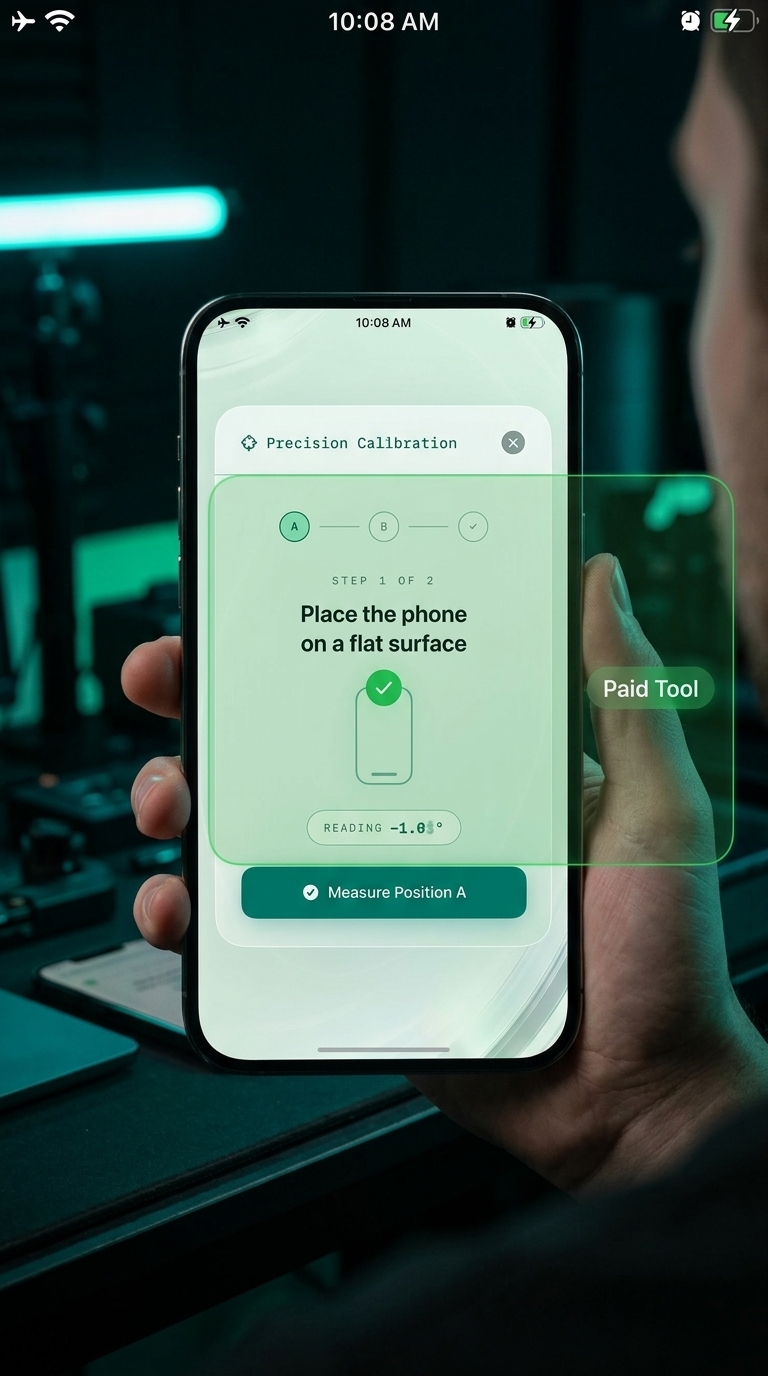
When comparing a free level app vs paid level tool, most people focus on features: modes, interfaces, unit support. But the single most important factor isn't any of those things. It's calibration.
Every iPhone and iPad ships with a built-in gyroscope and accelerometer, but no two sensors are perfectly identical. Manufacturing tolerances, device age, temperature, and even how your phone sits in its case can all introduce sensor drift — small but consequential errors that compound across a measurement. Without a calibration system, a level app is just reading raw sensor data and presenting it as truth.
This is exactly where free and paid tools diverge most sharply.
Free apps almost never include calibration. They pull the raw tilt value from the device, display a bubble or degree number, and call it done. On a brand-new flagship iPhone, that might get you within a degree or so. On an older device — or one that's been dropped, heated, or jostled — the error can grow to 2–4 degrees without you ever suspecting it. That's the difference between a shelf that looks right and one that visibly slopes toward the wall.
Paid tools invest heavily in calibration. LevelPro uses an intelligent 2-step calibration system that walks you through positioning your device in two specific orientations to calculate and correct for your unique sensor variance. The result is a reading you can actually trust, not just one that looks plausible.
To understand how much sensor accuracy matters in practice, it's worth reading our deeper dive on whether the iPhone level tool is actually accurate. Short answer: it depends entirely on whether it's been calibrated.
Here's what the calibration gap means in real-world use:
- Hanging shelves: A 1.5° error over a 90cm shelf means one end sits nearly 2.5cm higher than the other — visible to the naked eye
- Setting door frames: Even half a degree of tilt causes binding, sticking, and uneven gaps
- Photography tripod alignment: Camera rigs need sub-degree accuracy; an uncalibrated app introduces persistent horizon lean
- Tile and flooring work: Cumulative errors across a room mean grout lines that fan out visibly by the far wall
For a closer look at the calibration process itself, our step-by-step guide on how to calibrate your iPhone level tool walks through exactly what a proper calibration workflow looks like, and why skipping it undermines everything else a level app tries to do.
Bottom line: a feature-rich level app without calibration is less useful than a simple, well-calibrated one. Calibration isn't a luxury add-on. It's the foundation that makes every other reading meaningful.
How Quickly Can You Tell the Difference Between a Free and Paid Level App?
One of the most common questions people ask when weighing a free level app vs paid level tool is whether the difference becomes obvious immediately, or only after something goes wrong. Honestly: you'll notice it within the first sixty seconds of serious use.
With a free app, the first thing most users notice is the absence of any setup process. You open it, a bubble or number appears, and that's it. No calibration prompt. No mode selection. No unit preference. It feels fast, but that instant start is a warning sign. A tool that doesn't account for how your device is positioned or what kind of surface you're measuring has made no effort to be accurate. It's just displaying a number.
With a paid tool like LevelPro, the first interaction is fundamentally different. The intelligent 2-step calibration system takes under a minute but immediately communicates that this is a precision instrument, one that accounts for your specific device rather than spitting out a generic reading from anonymous hardware.
Here's how the experience typically unfolds at different stages of use:
- First 60 seconds: A paid tool prompts calibration and lets you choose your mode (Bullseye or Tubular). A free app shows raw output with no configuration.
- First project: On simple tasks like leveling a picture frame, both tools may feel adequate. The paid tool's display is cleaner, feedback is crisper, and haptic confirmation of a level surface is immediately satisfying.
- First complex task: Setting a door frame, aligning a camera rig, or checking a concrete pour — this is where the gap widens. Uncalibrated free apps show readings that fluctuate or subtly disagree with a physical spirit level. A calibrated paid tool stays consistent.
- First awkward position: When you can't see the screen while holding the device in place, the Hold function in a paid tool becomes indispensable. Free apps almost never include it, forcing you to estimate or reposition unnecessarily.
- First professional handoff: When you're sharing measurements with a colleague or documenting a site condition, a precise reading from a calibrated tool carries weight. A screenshot from an uncalibrated free app doesn't.
For users tackling practical tasks like hanging shelves with a level tool, the difference often becomes clear the moment their free app reading and their physical level reading don't agree, and they're not sure which one to trust.
The upgrade path is rarely dramatic. It's a series of small frustrations with a free app, a reading that seems off, a feature that isn't there, a number that doesn't hold steady, that accumulates until the case for a proper paid tool becomes obvious. You don't need to wait for a costly mistake to know when you've outgrown a free option. Most professionals who switch to LevelPro say they wished they'd done it sooner, particularly when they discover features like how to measure specific angles with a level tool app using Target Angle mode with haptic feedback, something no free app in the category currently offers.
In short: the difference is immediate if you know what to look for, and inevitable even if you don't.
Free Level App vs Paid Level Tool: The Verdict
After walking through calibration, feature gaps, and real-world performance differences, the conclusion on the free level app vs paid level tool debate is clear, though it's also nuanced. The right choice genuinely depends on what you're building, installing, or aligning.
For casual use, a free level app will likely serve you well enough. Checking whether a TV stand looks roughly straight, getting a ballpark reading for a DIY weekend project, or confirming that a table isn't wildly uneven — none of these tasks require precision instruments. Grab a free app, take a reading, and move on.
When your work demands accuracy, a free level app is the wrong tool. Here's a simple checklist to know when you've crossed that threshold:
- You're aligning something that will be permanently fixed to a wall, floor, or structure
- A measurement error of more than 0.5° would be visible or consequential
- You're working in awkward positions where you can't watch the screen continuously
- You're documenting measurements for professional handoff or review
- You need to set a specific angle, not just confirm something is flat
- You're working across multiple surfaces and need consistent, repeatable readings
If any of those apply, a calibrated, professional-grade paid level tool isn't an upgrade — it's a necessity.
LevelPro was built for exactly this gap. Intelligent calibration, multiple professional modes, AR Camera view, Apple Watch integration, and thoughtful haptic feedback come together in a single refined instrument. Architects, photographers, engineers, and builders can trust it on every project, not just the simple ones.
Still exploring your options? Our guide to the best spirit level app for iPhone covers what's available in 2025, including how LevelPro compares across every meaningful dimension. And if you're new to digital level tools entirely, the step-by-step guide on how to use a spirit level app is the best place to start before committing to any tool.
The bottom line: a free level app costs you nothing upfront and costs you precision over time. A paid level tool costs a subscription and saves you from the mistakes you never knew you were making.
For work that matters, that trade-off is an easy call.
LevelPro: The Paid Level Tool Built for Professionals
LevelPro is a premium digital spirit level for iPhone and iPad that goes far beyond what any free level app can offer. Two professional measurement modes — Bullseye for flat surfaces and Tubular for edges — combine with an intelligent 2-step calibration system that corrects for device sensor variance. The AR Camera mode lets you see the actual surface beneath your device in real time, while Apple Watch integration delivers live readings right on your wrist. Target Angle mode with haptic and audio feedback lets you lock in specific angles with precision, and the Hold function freezes readings when you can't watch the screen. Multiple measurement units, a sophisticated dark interface with neon accents, and a design philosophy centered on elegance make LevelPro a tool professionals are proud to use. All features are available exclusively to active subscribers.
Ready to Upgrade from a Free Level App?
If you've been relying on a free level app for work that demands accuracy, it might be time to see what a properly built tool feels like. Try LevelPro and experience the difference calibration, professional modes, and thoughtful design make on your very next project.
Frequently Asked Questions
Are free level apps accurate enough for professional use?
Free level apps can provide rough readings for casual tasks, but they rarely include calibration systems, leaving them prone to sensor drift and device-specific errors. For professional use — construction, photography, interior design — a calibrated paid level tool is significantly more reliable.
What features do paid level apps have that free ones don't?
Paid level apps typically offer multi-step calibration, multiple measurement modes (bullseye and tubular), target angle setting with haptic feedback, AR camera overlays, Apple Watch integration, and support for multiple measurement units — features that free apps almost never include.
Is a phone level app as accurate as a physical spirit level?
A well-calibrated phone level app using a modern iPhone's high-precision sensors can match or exceed the accuracy of a standard bubble spirit level. The key word is calibrated — without a proper calibration system, any app (free or paid) will underperform compared to a physical tool.
What is the Hold function in a level app and why does it matter?
The Hold function freezes the current reading on screen so you can reposition the device or check the measurement without losing the angle data. It's especially useful when leveling surfaces in tight or awkward spaces where you can't see the screen while holding the device in place.
Is LevelPro worth the subscription cost?
LevelPro is designed for users who need precision and polish — architects, engineers, photographers, and builders. With features like intelligent 2-step calibration, AR camera mode, Apple Watch support, and a refined dark UI with haptic feedback, it offers professional-grade functionality that justifies a subscription over relying on a free, uncalibrated app.